
QuickBooks Online Purchase Orders vs Foxpedite
Last updated: November 2, 2026 · Competitor facts as of October 2026 · By Foxpedite Editorial Team
Disclosure: We make Foxpedite, which syncs with QuickBooks Online. This isn't "instead of QuickBooks"; Foxpedite works alongside it. QuickBooks facts below come from Intuit's help and community pages, dated. Corrections: info@foxpedite.com, reviewed within 5 business days.
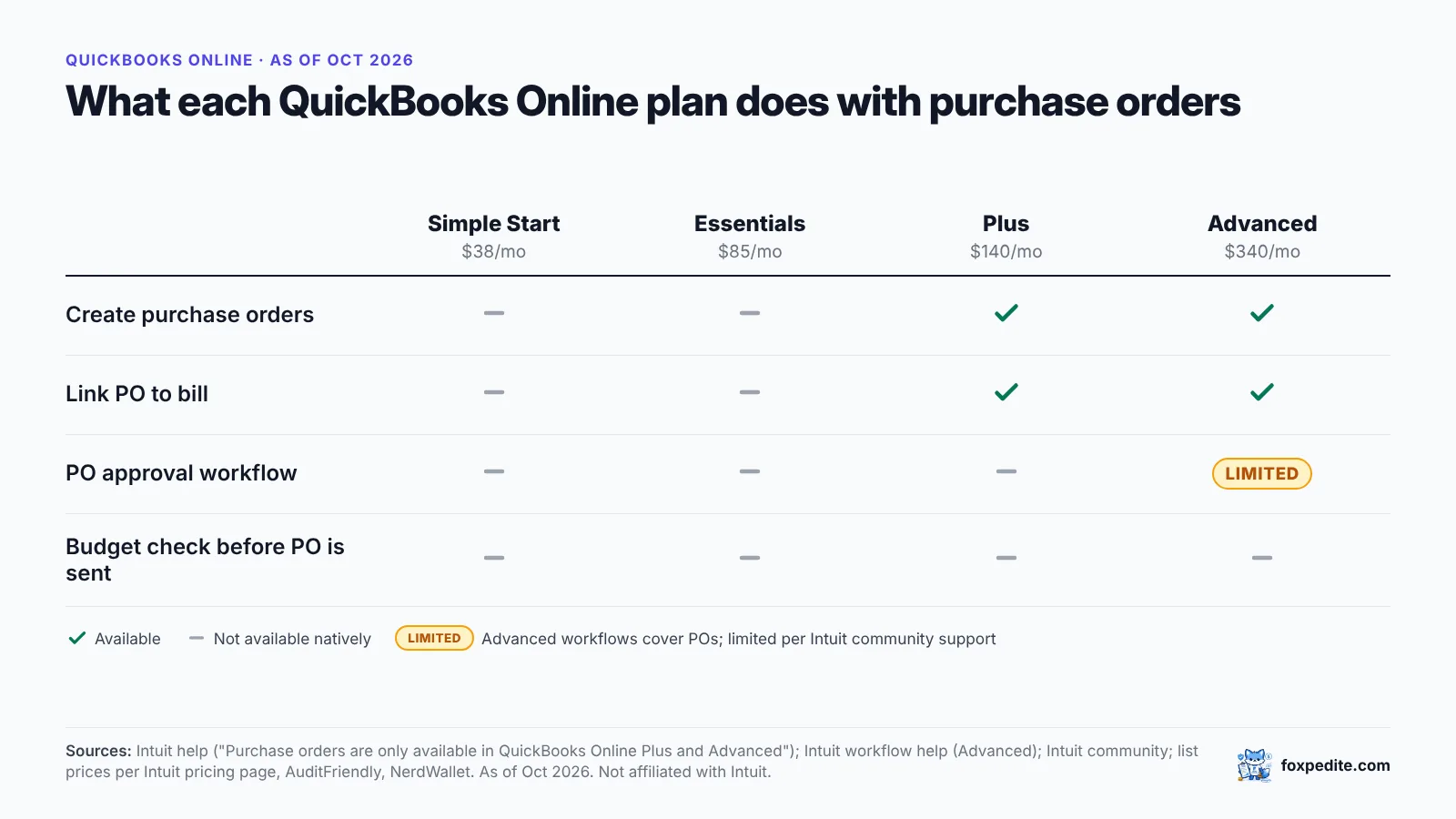
Short answer: QuickBooks Online handles purchase orders on its Plus and Advanced plans: you can create POs, email them, and convert them to bills, including partial quantities. QuickBooks Online Simple Start and Essentials can't create purchase orders; PO approval workflows are limited (Advanced only, per Intuit community support). If you need budgets checked when purchases are requested, multi-step approvals, receiving and three-way match, a procurement tool that syncs to QuickBooks adds those. If you don't, QuickBooks alone may be enough.
Want to see approvals on top of your own QuickBooks? Try Foxpedite free for 14 days, every Advanced feature included (approvals and the QuickBooks Online sync among them), no card. Start the trial →
What QuickBooks Online does with POs (as of October 2026)
From Intuit's help article on purchase orders:
- Plans: "Purchase orders are only available in QuickBooks Online Plus and QuickBooks Online Advanced."
- PO to bill: when the vendor ships, record the PO as a bill or expense; open POs appear when you select the vendor.
- Partial receipts: add only the received portion to a bill; link multiple transactions to one PO; QuickBooks closes the PO when everything's billed.
- Approvals: the help article doesn't describe a PO approval workflow.
From Intuit community support:
- PO approval workflow is "only available in QuickBooks Advanced," with one PO approval workflow active at a time and one approver per condition.
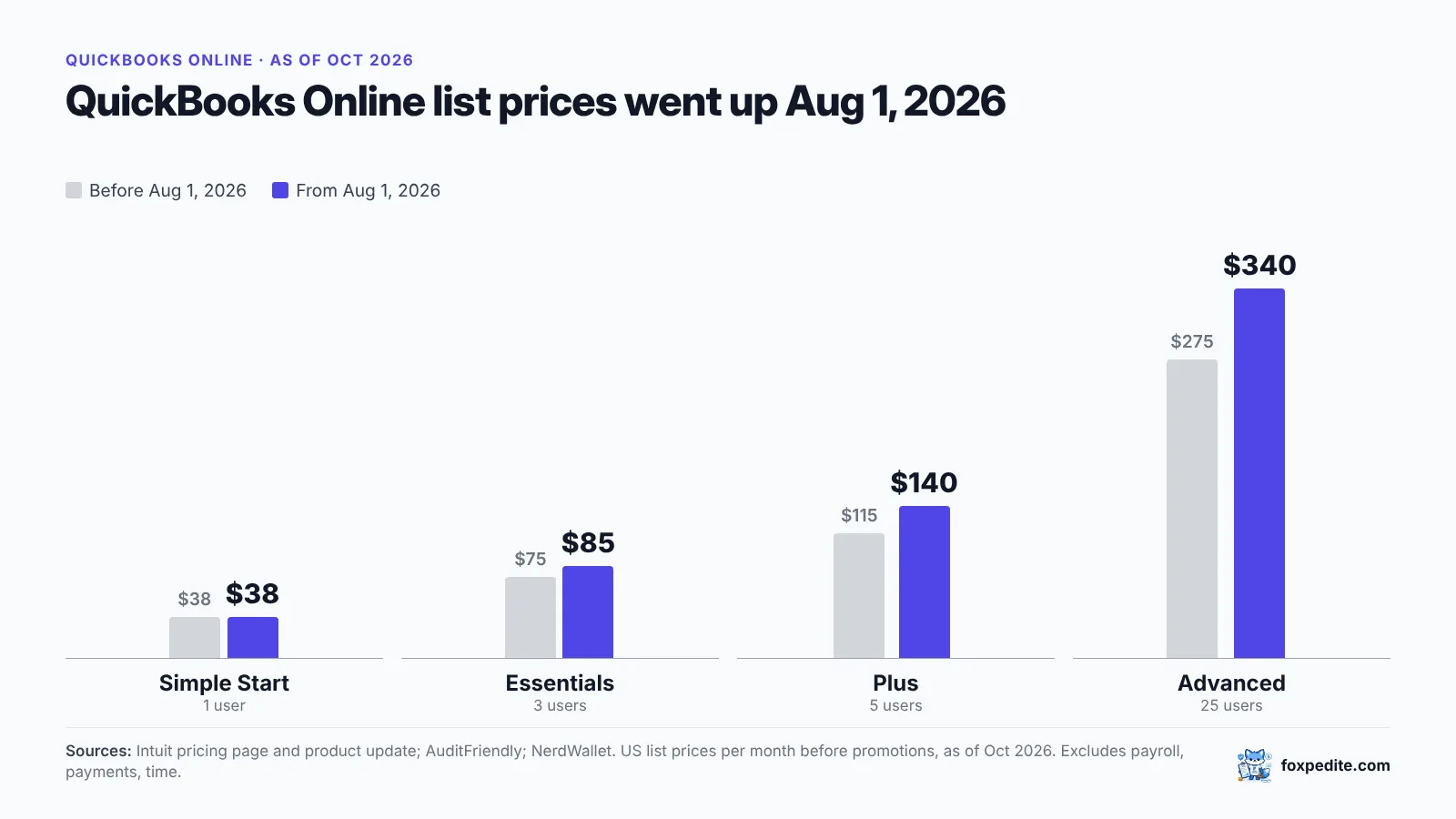
Pricing (list, since Aug 1, 2026): Simple Start $38, Essentials $85, Plus $140 (5 users), Advanced $340 (25 users) per month, per NerdWallet.
Side by side
| QuickBooks Online Plus | QuickBooks Online Advanced | QBO + Foxpedite | |
|---|---|---|---|
| Create and email POs | Yes | Yes | Yes (in Foxpedite; bills sync to QBO) |
| PO → bill, partial billing | Yes | Yes | Yes |
| PO approval workflow | Not available per Intuit community | One workflow at a time, per Intuit community | Multi-step routing by amount, department, category; approve from email (Advanced plan) |
| Purchase requests from staff | Not described in Intuit PO article | Not described in Intuit PO article | Yes |
| Budget check at request | Not described | Not described | Yes: reserved at draft |
| Receiving record | Partial billing against PO | Partial billing against PO | Goods receipt per delivery |
| Three-way match | Not described | Not described | Yes |
| Vendor portal, scoring, RFQ | Not described | Not described | Yes (Advanced) |
| Monthly cost | $140 | $340 | QBO plan + Foxpedite ($390 Regular / $740 Advanced) |
"Not described" means not found in the Intuit pages cited on the date checked. QuickBooks App Store apps can add capabilities.
Important: QuickBooks Online sync is on Foxpedite's Advanced plan, and so are approval workflows. Most QuickBooks users comparing against this page will be looking at Advanced ($740/month).
Example scenario: when QuickBooks alone stops being enough
Example scenario (illustrative). A 35-person electrical contractor on QuickBooks Online Plus. Three project managers order materials; the office manager types POs into QuickBooks after the fact.
What happens in a typical month:
- 60 POs, 45 of them entered after the order was placed.
- One project's materials budget ($40,000) is overspent by $6,200, discovered at month-end job costing.
- Two supplier invoices billed for full quantities when deliveries were partial: $1,150 overbilled in total, caught only because the foreman complained.
Options:
- Upgrade to QBO Advanced (+$200/month): gets one PO approval workflow. Doesn't change when POs get entered.
- Add a procurement tool that syncs to QBO: PMs draft requests before ordering; the $40,000 job budget is reduced at each draft, so the PM sees "$2,100 remaining" before placing the order that would have overspent it; receipts are recorded on site; invoices match against them.
Cost of option 2 with Foxpedite Advanced (20 users included), staying on QBO Plus: $740 + $140 = $880/month.
When QuickBooks Online alone is the better choice
- One or two people place all orders, and the owner already sees them.
- Low volume. You issue a handful of POs a month and need them mainly as documents to send vendors.
When adding Foxpedite makes sense
- Several people commit money and you find out after. Foxpedite checks the budget at the request, before anyone orders.
- You're on Simple Start or Essentials and need POs without changing accounting plans.
- You need approvals by amount and department (Advanced), with backups, and approvers who approve from email instead of logging in to QuickBooks.
- You pay for goods that weren't delivered, or can't tell. Invoices pay only when matched to the PO and receipt.
How Foxpedite works with QuickBooks
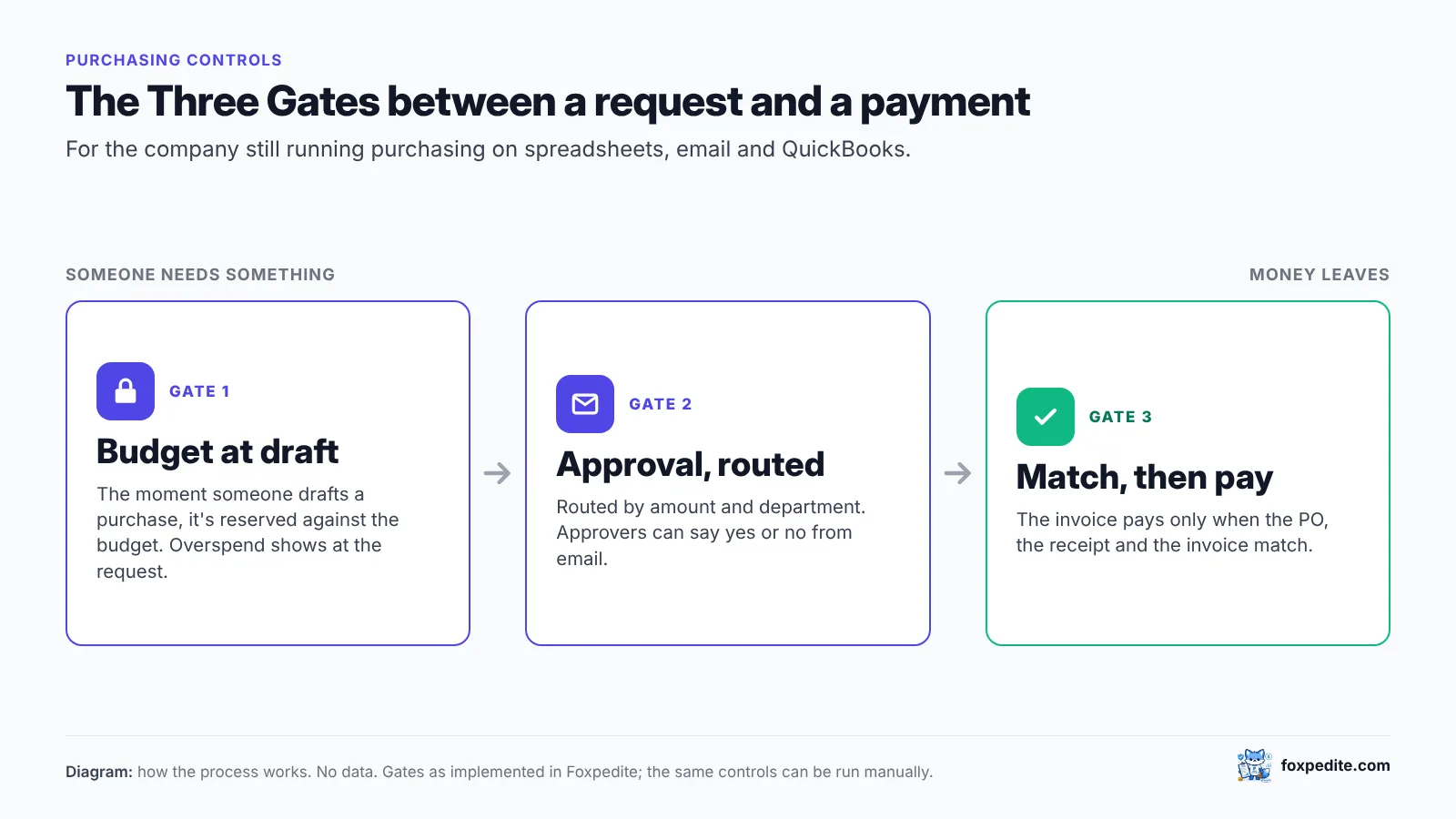
Gate 1: budget at the draft. The moment someone drafts a purchase, Foxpedite reserves it against the budget. You see overspend at the request, not at month-end. Gate 2 (Advanced): approval routed by amount and department, approvable from email. Gate 3: the invoice pays only when PO, receipt and invoice match. On Advanced, the approved bill syncs to QuickBooks Online. See Integrating QuickBooks Online with a Procurement Platform.
Start a 14-day trial, all Advanced features, no card · Book a demo
FAQ
Which QuickBooks Online plans have purchase orders? Plus and Advanced, per Intuit's help article. Simple Start and Essentials can't create purchase orders.
Can QuickBooks Online approve purchase orders? PO approval workflows are limited to Advanced, per Intuit community support, with one workflow active at a time.
Do I have to replace QuickBooks to use Foxpedite? No. Foxpedite runs purchasing and syncs to QuickBooks Online (Advanced plan). QuickBooks stays your accounting system.
Do I need QuickBooks Plus to use POs in Foxpedite? No. POs live in Foxpedite. Ask us how bills sync to your specific QuickBooks plan during the trial.
Sources (accessed October 2026)
- Intuit help, purchase orders: https://quickbooks.intuit.com/learn-support/en-us/help-article/purchase-orders/add-purchase-orders-expenses-bills-checks-online/L9pRK49uC_US_en_US
- Intuit community, PO approval: https://quickbooks.intuit.com/community/other-questions-55/add-multiple-approvers-for-purchase-order-approval-131805
- NerdWallet, QuickBooks pricing: https://www.nerdwallet.com/article/small-business/quickbooks-pricing
- AuditFriendly, QBO price increase 2026: https://auditfriendly.co/answers/quickbooks-online-price-increase-2026
- Foxpedite pricing: https://www.foxpedite.com/pricing
QuickBooks and Intuit are trademarks of Intuit Inc. Foxpedite is not affiliated with or endorsed by Intuit.