
ApprovalMax Alternatives for QuickBooks Online Users
Last updated: November 2, 2026 · Competitor facts as of October 2026 · By Foxpedite Editorial Team
Disclosure: Foxpedite is our product. This page uses only public information, linked and dated. We don't rate other products. Corrections: info@foxpedite.com, reviewed within 5 business days.
Short answer: ApprovalMax is an approval layer for accounting systems (Xero, QuickBooks Online, NetSuite). Its QuickBooks Online pricing page lists bill, purchase order and expense approval workflows on all plans, with bill-to-PO matching and budget checks on its Advanced and Premium plans (as of October 2026). People look for alternatives when they want the purchase itself to start in a request system, with receiving, three-way match and vendor management, rather than approving documents created in QuickBooks. Options include QuickBooks Online Advanced's own workflows, procurement platforms with QBO sync (Foxpedite, Precoro, Procurify), and spend platforms with procurement add-ons.
Want to test one on your own purchases? Try Foxpedite free for 14 days, every Advanced feature included, no card. Start the trial →
What ApprovalMax publishes (QuickBooks Online pricing page, October 2026)
- Plans: Standard, Advanced, Premium.
- All plans: bill approval workflows, PO approval workflows, expense approvals, sales invoice approval, unlimited users, unlimited approval workflows and multi-step approvals, two-way QBO sync, mobile app, audit reports.
- Advanced and Premium: bill-to-PO matching, budget checks before approving, auto-approvals, review step, an AI "Approval Agent" for bill checks.
- Premium: stand-alone workflows, public API, phone support.
- Pricing: per organization, monthly or yearly billing; dollar amounts were not displayed on the page when checked ("Get in touch with our team").
- Trial: "Start a free trial," "No credit card required"; length not stated.
- Add-ons: ApprovalMax Capture (OCR), training package; prices not shown.
ApprovalMax's page may have changed since October 2026; check the current version before deciding.
Why QuickBooks users look at approval tools in the first place
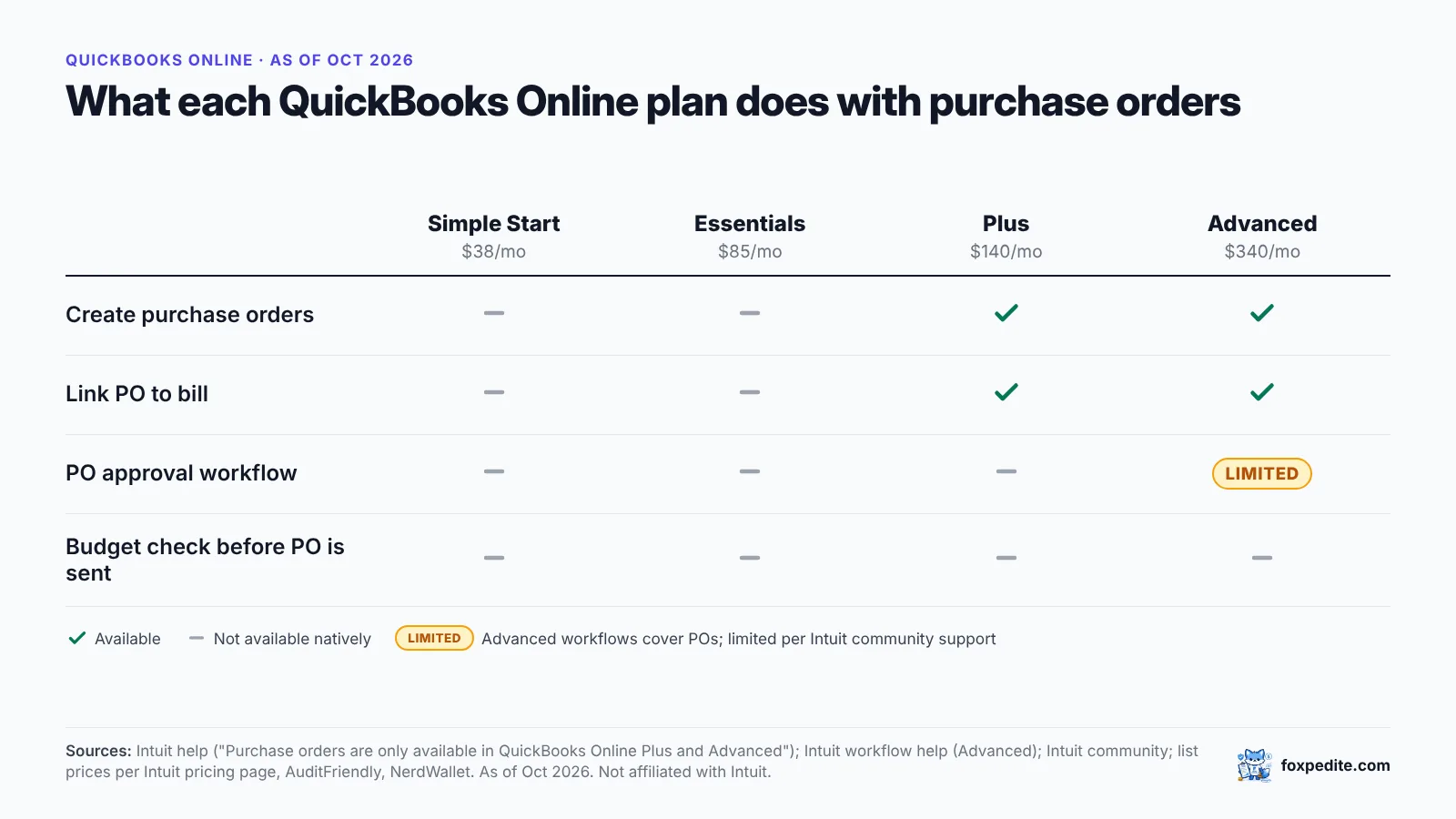
Intuit's help docs state that purchase orders are available only on QuickBooks Online Plus and Advanced. QuickBooks Online Simple Start and Essentials can't create purchase orders; PO approval workflows are limited (Advanced only, per Intuit community support). Intuit community support also notes that Advanced supports one PO approval workflow at a time.
So the options run from "upgrade QuickBooks" to "add an approval layer" to "move purchasing into a procurement tool that syncs to QuickBooks."
Alternatives at a glance
| Option | What it is | Published price (as of October 2026) | Source |
|---|---|---|---|
| QuickBooks Online Advanced | Native POs; one PO approval workflow at a time | $340/mo (25 users) | Intuit; NerdWallet |
| ApprovalMax | Approval layer for QBO/Xero/NetSuite | Not displayed | approvalmax.com |
| Precoro | Procurement platform; QBO integration on Core | Core from $499/mo (annual) | precoro.com/pricing |
| Procurify | Procurement platform; QBO integration | Quote | procurify.com/pricing |
| Foxpedite (ours) | Procurement platform; QBO sync on Advanced | Regular $390/mo; Advanced $740/mo | foxpedite.com/pricing |
Approval layer vs procurement platform
| Approval layer (e.g., ApprovalMax) | Procurement platform (e.g., Foxpedite) | |
|---|---|---|
| Where the purchase starts | Typically in the accounting system | A request in the procurement tool |
| Approvals | Core function | Included (Foxpedite Advanced) |
| Budget check | Listed on ApprovalMax Advanced/Premium | Budgets at request |
| Receiving / goods receipt | Not listed on ApprovalMax QBO pricing page | Included |
| Three-way match (PO + receipt + invoice) | Bill-to-PO matching listed (Advanced/Premium) | Included |
| Vendor management, RFQ | Not listed on ApprovalMax QBO pricing page | Included (Foxpedite Advanced) |
"Not listed" means not found on the public page on the date checked.
Example scenario: a 30-person HVAC contractor
Example scenario (illustrative). Technicians buy parts from three supply houses. The owner wants to approve anything over $1,000 and stop paying for parts that never arrived on site.
- An approval layer lets the owner approve POs and bills before they post to QuickBooks.
- A procurement platform adds the receipt: the tech records what arrived at the job, and the supplier's invoice only becomes payable when it matches the PO and that receipt. Example: a $1,480 invoice for 40 fittings when 32 were received gets held for the $296 difference (8 × $37).
If approvals are the whole problem, the first is the simpler choice.
When ApprovalMax is the better choice
- Approvals are your only gap, and you want everything else to stay inside QuickBooks Online or Xero.
- You use Xero or NetSuite too, or manage many organizations (ApprovalMax prices per organization).
When a procurement platform may fit better
- Purchases happen before anything exists in QuickBooks, by phone, email or online carts.
- You need receiving and three-way match on physical goods.
- You want budgets checked at the draft, plus vendor scoring and RFQs (Foxpedite Advanced).
Where Foxpedite fits
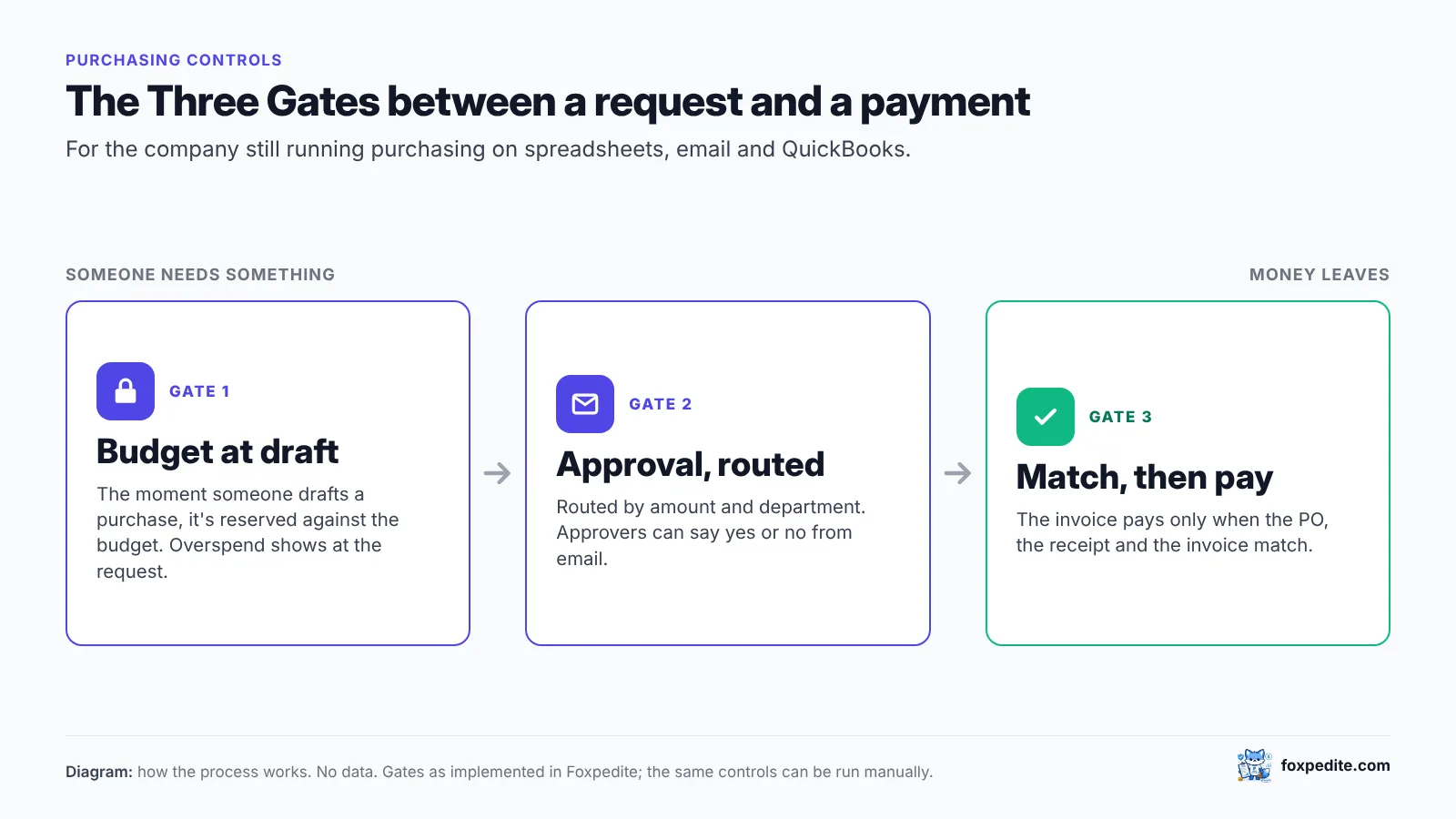
Built for companies running purchasing on spreadsheets, email and QuickBooks. The moment someone drafts a purchase, Foxpedite reserves it against the budget, so you see overspend at the request, not at month-end. On Advanced, approvals route by amount and department and work from email. Invoices pay only when PO, receipt and invoice match, and approved bills sync to QuickBooks Online (Advanced plan).
Start a 14-day trial, no card · Book a demo
FAQ
What does ApprovalMax do? It adds approval workflows to accounting systems. For QuickBooks Online, its pricing page lists bill, PO and expense approvals on all plans (as of October 2026).
How much does ApprovalMax cost? Its QBO pricing page showed plan names and per-organization billing but no dollar amounts when we checked in October 2026. Contact ApprovalMax for current prices.
Can QuickBooks Online approve purchase orders on its own? PO approval workflows are limited to QuickBooks Online Advanced, per Intuit community support, with one active PO approval workflow at a time.
Is Foxpedite an ApprovalMax replacement? For approvals on purchases, yes, as part of a wider procurement flow. If you only need approvals inside QuickBooks or Xero, an approval layer may be simpler.
Sources (accessed October 2026)
- ApprovalMax pricing index: https://www.approvalmax.com/pricing
- ApprovalMax for QuickBooks Online pricing: https://approvalmax.com/pricing/approvalmax-for-quickbooks-online
- ApprovalMax support, QBO edition limitations: https://support.approvalmax.com/en/articles/414035-limitations-of-the-different-quickbooks-online-editions
- Intuit, purchase orders in QBO: https://quickbooks.intuit.com/learn-support/en-us/help-article/purchase-orders/add-purchase-orders-expenses-bills-checks-online/L9pRK49uC_US_en_US
- Intuit community, PO approval (Advanced): https://quickbooks.intuit.com/community/other-questions-55/add-multiple-approvers-for-purchase-order-approval-131805
- QBO pricing: https://www.nerdwallet.com/article/small-business/quickbooks-pricing ; https://auditfriendly.co/answers/quickbooks-online-price-increase-2026
- Precoro pricing: https://precoro.com/pricing ; Procurify pricing: https://www.procurify.com/pricing/
- Foxpedite pricing: https://www.foxpedite.com/pricing
ApprovalMax, QuickBooks, Xero, NetSuite, Precoro and Procurify are trademarks of their respective owners. Foxpedite is not affiliated with or endorsed by any of them.